
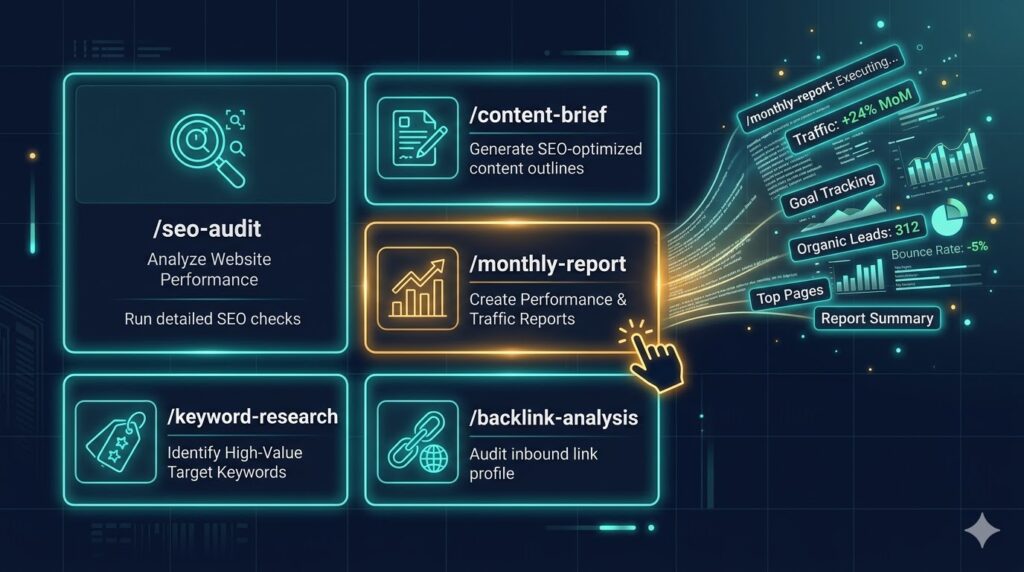
The highest-leverage thing you can do in Claude Code isn’t a prompt. It’s a skill.
A prompt is something you type once and forget. A skill is something you build once and run forever — a saved, reusable command that executes a complete workflow with a single slash command. Type /seo-audit and Claude runs your full audit sequence. Type /content-brief and it drafts a complete brief using your template, your client context, and live keyword data.
If you’ve set up CLAUDE.md for your clients and connected your MCP tools, skills are the final layer that turns Claude Code from a powerful tool into a repeatable system. This post walks through exactly how to build them and gives you five ready-to-use skills that every SEO practitioner should have.
What a Claude Skill Actually Is
Skills in Claude Code are stored prompt templates — Markdown files saved in a specific folder that become available as slash commands in any session. When you type /skill-name, Claude loads the template, injects any current context (your CLAUDE.md, the files in your working directory, any MCP data), and executes the workflow.
The key difference from a saved note or a prompt library: skills are context-aware. A /content-brief skill doesn’t just run a generic template — it runs that template against your current working directory, picks up the client’s CLAUDE.md, and uses whatever MCP data is available. The skill is the same every time; the output is customized to the context.
Skills live at:
~/.claude/skills/Each skill is a .md file. The filename (without extension) becomes the slash command.
How to Create a Skill
Creating a skill takes about 60 seconds. Here’s the pattern:
Step 1. Create the skills directory if it doesn’t exist:
mkdir -p ~/.claude/skillsStep 2. Create a new Markdown file for your skill:
nano ~/.claude/skills/seo-audit.mdStep 3. Write the skill. A skill file is just a prompt — written in Markdown, as detailed or as concise as the task requires. You can reference MCP tools, instruct Claude to read specific files, ask for structured output formats, and chain multiple tasks together.
Step 4. Save the file. The skill is immediately available in any Claude Code session as /seo-audit.
That’s it. No configuration, no restart required.
5 Skills Every SEO Should Build First
Skill 1: /seo-audit
A full SEO audit prompt sequence — pulling GSC data, surfacing CTR underperformers, flagging declining pages, and checking for cannibalization. This is the workflow from the content audit post, packaged as a single command.
Save as: ~/.claude/skills/seo-audit.md
Run a full SEO content audit for the current client using the following sequence:

1. Pull all pages from Google Search Console for the last 90 days. For each page: URL, impressions, clicks, CTR, average position. Sort by impressions descending.

2. Identify pages where impressions exceed 500, CTR is below 2%, and position is between 1–15. These are the CTR quick wins — list them ranked by impressions.

3. Compare the last 90 days vs the prior 90 days. Flag any pages where clicks have dropped more than 25% period over period. List with absolute numbers and percentage change.

4. Check for keyword cannibalization: identify queries where two or more pages appear in the same results. Flag cases where competing pages rank within 5 positions of each other.

5. Synthesize everything into a prioritized action list organized into three tiers:
   - Quick wins (under 2 hours of work, highest expected impact)
   - Medium-term fixes (require substantial content work)
   - Monitor only

For each item: URL, problem, recommended action.

Output the full audit in a clean format ready to share with a client or paste into Notion.
Skill 2: /content-brief
Drafts a full content brief using live keyword data from Ahrefs and GSC, combined with the client’s CLAUDE.md context. One command replaces 45 minutes of manual research.
Save as: ~/.claude/skills/content-brief.md
Draft a complete content brief for the target keyword I specify. Use the following process:

1. Ask me for the target keyword if I haven't provided one.

2. Use Ahrefs to pull: keyword difficulty, monthly search volume, top 10 ranking URLs for this keyword, and their estimated traffic. Identify the common content formats in the top 10 (guides, listicles, comparison pages, etc.).

3. Use Google Search Console to check if any of my existing pages currently rank for this keyword or closely related variants. Note position and impressions.

4. Draft the brief with these sections:
   - Target keyword + primary intent
   - Secondary keywords to cover
   - Recommended content format and length (based on what's ranking)
   - Recommended H1 and title tag
   - Suggested H2 structure (6–8 subheadings)
   - Key points to cover in each section
   - What competitors are missing that I could own
   - Internal linking opportunities (based on my existing content)
   - CTA recommendation

Apply all brand voice and audience guidelines from the client's CLAUDE.md file.
Once the brief is done, use Claude’s custom visuals feature to map the full topic cluster visually — it generates a clickable diagram from the brief output in one follow-up prompt, which is faster than building the same thing in a spreadsheet or FigJam.
For content briefs built around a full topical authority map — with EAV gap analysis, entity architecture from CLAUDE.md, and live Ahrefs data built in — the /content-brief skill in the topical authority mapping guide covers the more advanced implementation that ties brief generation directly to a living topical map.
Skill 3: /title-optimizer
Rewrites title tags and meta descriptions for any page — informed by current ranking position, CTR benchmarks, and brand voice. Feed it a list of URLs and it works through all of them.
Save as: ~/.claude/skills/title-optimizer.md
Rewrite the title tags and meta descriptions for the pages I provide.

For each page:

1. Check Google Search Console for the page's current average position and CTR.

2. Based on that position, calculate the expected CTR using standard benchmarks (position 1: ~28%, position 2: ~15%, position 3: ~11%, positions 4–10: ~6% declining to ~2%). If actual CTR is below benchmark, flag it as a priority.

3. Rewrite the title tag:
   - Lead with the primary keyword where natural
   - Under 60 characters
   - Include a specific value hook (number, outcome, or differentiator)
   - Match the brand voice from CLAUDE.md

4. Rewrite the meta description:
   - 140–155 characters
   - One clear benefit statement
   - End with an implicit or explicit CTA
   - Do not repeat the title verbatim

5. For each page provide: original title | new title | original meta | new meta | priority flag (high/medium/low based on CTR vs benchmark gap).

Process all pages before stopping. If I haven't provided URLs, ask me to paste them now.
Skill 4: /competitor-gap
Pulls the organic keyword landscape for one or more competitors using Ahrefs, identifies gaps where they rank and I don’t, and prioritizes the gaps by traffic opportunity.
Save as: ~/.claude/skills/competitor-gap.md
Run a competitor keyword gap analysis using Ahrefs.

1. Ask me which competitor domain(s) to analyze if I haven't provided them.

2. For each competitor, pull their top 50 organic keywords by estimated traffic. Include: keyword, position, monthly search volume, keyword difficulty, and the ranking URL.

3. Cross-reference against my Google Search Console data. Identify keywords where the competitor ranks in the top 10 and I either don't rank at all or rank below position 20.

4. Filter the gap list to keywords with:
   - Monthly search volume above 200
   - Keyword difficulty below 50
   - Clear commercial or informational intent that matches my content strategy

5. Organize the gap list into three categories:
   - Quick wins: low difficulty (under 30), good volume — I could rank here with one strong piece
   - Medium investment: moderate difficulty (30–50) — worth pursuing over 3–6 months
   - Long-term plays: high difficulty or low volume but strategically important

6. For each quick win, recommend a content format and draft a one-sentence content angle.

Output as a clean table I can paste into a client report or Notion.
Skill 5: /monthly-report
Drafts the monthly SEO performance report for a client — pulling live data, comparing to the prior month, and writing the executive narrative. What used to take two hours now takes two minutes.
Save as: ~/.claude/skills/monthly-report.md
Draft the monthly SEO performance report for the current client.

1. Pull Google Search Console data for the last 30 days and the prior 30 days. Get: total clicks, total impressions, average CTR, average position. Calculate month-over-month change for each metric.

2. Pull the top 10 pages by clicks for the current month. Note any significant changes from the prior month (new entries, dropped pages, large traffic shifts).

3. Pull the top 10 queries by clicks for the current month. Note any significant changes.

4. Check Ahrefs for any significant changes in domain rating or referring domains month-over-month.

5. Write the report in this structure:

   **Executive Summary** (3–4 sentences: what happened this month, the headline number, one win, one concern)

   **Traffic Performance** (table: metric | this month | last month | change)

   **Top Performing Pages** (table with month-over-month comparison)

   **Keyword Highlights** (top queries + notable changes)

   **Authority Signals** (backlink changes, referring domain trends)

   **Recommended Actions for Next Month** (3–5 specific, prioritized items)

Tone: professional and confident. Write for a client who cares about outcomes, not platform mechanics. Apply the brand voice from CLAUDE.md where applicable.
The Compounding Effect of Skills
Each skill you build is a one-time investment that pays out every time you use it. A /monthly-report skill that saves you 90 minutes pays for its 10-minute build cost the first time you run it. By month three, you’ve saved eight hours of reporting work.
The more powerful effect is consistency. When every report, every audit, and every brief runs through the same structured workflow, your outputs become predictable in the best sense — clients know what to expect, teammates can run the same skills, and quality doesn’t depend on who happened to write the prompts that day.
Skills also compound with CLAUDE.md. The better your client context files, the more personalized each skill’s output is without any additional effort from you. The two systems reinforce each other.
Building Your Own Skills
The five skills above are starting points. The ones that will be most valuable to you are the ones built around the workflows you personally run most often. A few prompts to help you identify where to start:
- What task do you do more than twice a week that involves a consistent sequence of steps?
- What’s the most time-consuming part of your client deliverables?
- What do you find yourself re-explaining to Claude at the start of sessions?
Any answer to those questions is a skill waiting to be built. Write the workflow out in plain English, save it to ~/.claude/skills/, and you’ve automated it.
Frequently Asked Questions
What is a Claude Code skill and how is it different from a saved prompt?
A skill is a saved prompt file that becomes a slash command in any Claude Code session. The critical difference from a saved prompt in a document or prompt library: skills are context-aware. When you run /seo-audit, Claude doesn’t just execute the template — it runs it against your current working directory, loads the relevant CLAUDE.md file, and calls any connected MCP tools. A prompt library entry is static; a skill is dynamic and responds to the context it’s run in.
Do Claude Code skills work across all client folders?
Yes. Skills saved to ~/.claude/skills/ are global — they’re available in every Claude Code session regardless of which directory you open it in. The skill template is always the same; what changes is the context it runs against. Open Claude Code in your Acme client folder and /monthly-report pulls Acme’s CLAUDE.md and GSC data. Open it in your Summit Dental folder and the same skill runs against Summit Dental’s context.
Can I share skills with my team?
Not automatically via the ~/.claude/skills/ path — that’s local to your machine. The easiest way to share skills with a team is to store the skill files in a shared Git repo or a shared folder and have each team member copy them into their own ~/.claude/skills/ directory. You can also maintain a “skills library” folder in your agency’s shared drive and document which ones to install for new team members.
How long should a skill file be?
As long as the workflow requires — no more. Simple skills (a specific output format, a one-step analysis) might be 5–10 lines. Complex skills like /monthly-report might be 30–40 lines covering a full multi-step workflow. The test is whether running the skill produces a useful, complete output without additional prompting. If you find yourself adding follow-up instructions after running a skill, those instructions belong in the skill file.
Can skills use MCP tools like Google Search Console and Ahrefs?
Yes — this is one of the most powerful combinations in Claude Code. If you have MCP servers connected, any skill can instruct Claude to call those tools as part of its workflow. The /seo-audit, /content-brief, /competitor-gap, and /monthly-report skills in this post all depend on MCP connections to work at their full potential. Without MCP, they’ll still run but Claude will ask you to paste in the data rather than pulling it live.
What happens if I run a skill without a CLAUDE.md file in the current directory?
The skill still runs — Claude just won’t have client-specific context to draw on. The output will be more generic: it’ll ask clarifying questions about brand voice and audience that CLAUDE.md would have answered automatically. For one-off tasks on sites you don’t have a CLAUDE.md for, this is fine. For any client you work with regularly, the combination of CLAUDE.md plus skills is what makes the system genuinely fast.
What’s Next
With skills, CLAUDE.md, and MCP all in place, the next logical step is automation — specifically, using Claude Code to run monthly client reports without you manually triggering every step. The next post covers exactly that: how to use Claude Code and Notion together to automate your entire reporting pipeline.
Want the full skills library — all five skills from this post plus ten more, pre-built and ready to drop into ~/.claude/skills/? They’re included in The AI Marketing Stack.