
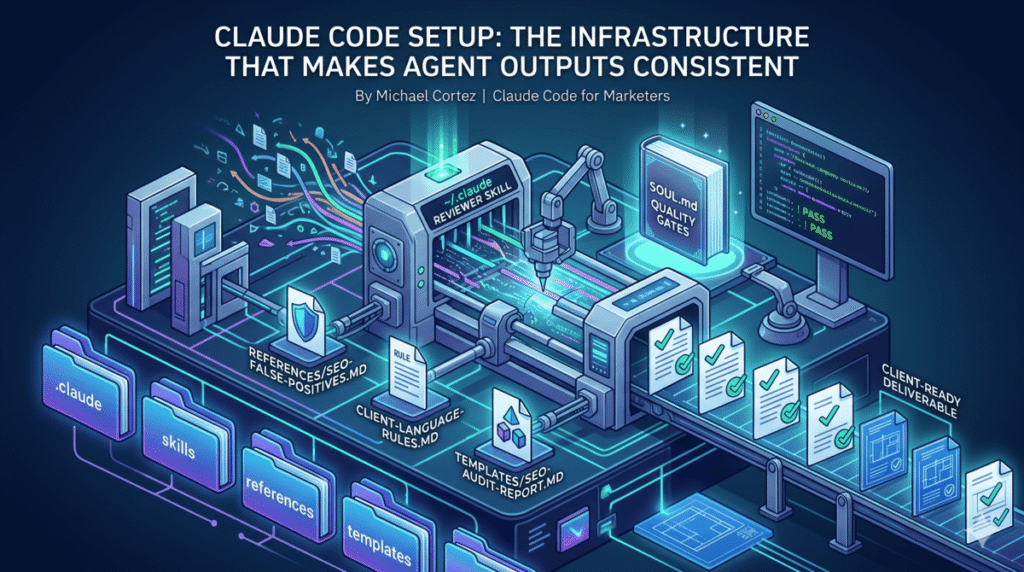
Most people set up Claude Code the same way. They create a CLAUDE.md, maybe add a few skills, and start running tasks. The folder structure looks right. The outputs vary anyway.
The gap isn’t in how the folder is organized. It’s that organization and reliability are different problems, and only one of them gets covered in every guide you’ll find.
This post covers the second one: the specific files, patterns, and habits that take a capable Claude Code setup and make it something you can trust with client work.
What the Folder Structure Gives You (And What It Doesn’t)
The .claude folder controls five things: instructions (CLAUDE.md and rules files), workflows (skills and commands), specialists (agents), permissions (settings.json), and memory. Every guide covers this.
What the folder structure doesn’t give you on its own:
- A definition of what “good output” looks like
- A way to catch bad findings before they reach a client
- Protection against repeating the same mistakes across runs
- Consistent output formats that match client expectations
- A mechanism for the setup to improve over time
Those come from a layer that sits on top of the folder structure. Here’s how to build it.
Start With a Quality Standard File
Before you write a single skill, write a file that defines what “good” looks like.
Save it at ~/.claude/SOUL.md. Every skill you write will read it before executing. Think of it as a style guide for accuracy and specificity, not tone.
The most useful format is a four-gate test. Before any finding, recommendation, or deliverable leaves a skill, it has to pass all four:
Gate 1: The Google Engineer Test
Can someone implement this without asking a follow-up question? A recommendation that says “improve your meta descriptions” fails. One that says “the meta description on /services/ is 42 characters — expand to 140-160 and include the phrase ‘Portland pool table installation'” passes.
Gate 2: The Agency Reputation Test
Would you send this to a client? Hedging language (“it might be worth considering”), unverified claims, and boilerplate that could apply to any site all fail this gate.
Gate 3: The Specificity Test
Does every recommendation include a specific page or element, the current state, the recommended change, and the expected impact? Missing any one of those four components is a failure.
Gate 4: The Stake-Your-Reputation Test
This is the judgment gate. If a finding feels shaky — thin evidence, a broad claim, data that doesn’t quite support the conclusion — flag it. If you wouldn’t defend it in front of the client, it doesn’t go in.
Four gates, applied to every output, documented once. That file travels with every skill you run.
The ~/.claude/ Folder Structure
With a quality standard defined, the rest of the structure has a purpose beyond organization.
~/.claude/
├── SOUL.md                    # Quality gates: read before every skill run
├── references/
│   ├── agent-failure-modes.md # 10 patterns that produce bad output
│   ├── seo-false-positives.md # Known findings that look right but aren't
│   ├── client-language-rules.md # Per-client terminology constraints
│   └── run-logs.md            # Appended after every skill execution
├── templates/
│   ├── seo-audit-report.md    # Exact field structure for SEO deliverables
│   ├── google-ads-audit.md    # Exact field structure for PPC audits
│   └── content-brief.md       # Exact field structure for content briefs
├── scripts/
│   ├── crawl-site.py          # Static crawler, ~300 pages
│   ├── crawl-site-js.py       # Playwright JS-rendering crawler with schema detection
│   └── fetch-gsc.py           # Correct GSC MCP call sequence
└── skills/
    ├── seo-audit/
    ├── google-ads-audit/
    ├── blog-post/
    └── review-deliverable/
references/ holds criteria files that skills load on demand, not everything at once. A false positive library, a failure mode checklist, per-client language rules. These are the files that prevent known mistakes from recurring.
templates/ holds strict output formats. A skill that fills a template produces a deliverable that looks the same every run: every field present, every section labeled correctly. A skill without a template produces whatever shape felt right that day.
scripts/ holds tested tools that actually run, not reminders to “use Ahrefs.” When a skill calls crawl-site-js.py, it runs Playwright, renders JavaScript, extracts schema types per page, and saves a structured JSON file. That’s a different level of reliability than a note to check something manually.
Build the Reviewer Before You Build Anything Else
This is the pattern most setups skip. The reasoning is straightforward: if you don’t define quality before building, you can’t enforce it after.
The reviewer is a skill saved at ~/.claude/skills/review-deliverable/SKILL.md and invoked with /review-deliverable. It reads every completed deliverable against the four-gate test in ~/.claude/SOUL.md and returns one of three verdicts:
- PASS — ready to deliver
- FLAG — specific issues to fix, listed with line-level citations
- HOLD — fundamental data or methodology problem; do not deliver without rework
The reviewer also checks ~/.claude/references/seo-false-positives.md for known false positive patterns, ~/.claude/references/client-language-rules.md for banned terminology per client, and verifies the deliverable’s format matches the relevant template in ~/.claude/templates/.
A real example of what a FLAG looks like:
[GATE 1 FAIL] "Improve internal linking structure" -- no specific
pages, no current state, no recommended pages to link. Rewrite to
name the orphaned pages and the pages that should link to them.

[GATE 3 FAIL] "Page speed is slow" -- missing current LCP value,
missing target, missing which specific resources are causing the delay.

[FALSE POSITIVE] "Thin content on /products/page/2/" matches known
false positive pattern: paginated pages. Verify before including.
That runs before the deliverable reaches the client. Not after.
The False Positive Problem
A false positive in a client deliverable is worse than a missed finding. A missed finding is a gap. A false positive is a claim that’s demonstrably wrong. The client knows it immediately.
Most Claude Code setups have no protection against them. The skill flags something, it looks plausible, it goes in the report.
The fix is a reference file: ~/.claude/references/seo-false-positives.md. It holds documented patterns of findings that look right but aren’t, organized by category.
Examples from the file:
- Paginated pages —
/page/2/,/page/3/flagged as thin content. They’re supposed to be short. Not a finding. - Filtered URLs —
/products/?color=redflagged as duplicate titles. The canonical points to/products/. Not a finding. - Plugin-injected schema — AIOSEO, Yoast, and RankMath inject schema via JavaScript. A static crawler won’t detect it. “No schema found” is not a finding; it’s a crawler limitation.
Every skill that produces findings is instructed to check this file before including anything in the output. When the SEO audit runs its 7 parallel specialist agents — technical, speed, on-page, content, schema, backlinks, and local — each one reads seo-false-positives.md before compiling its findings section.
The file grows over time. Every run where a false positive gets caught adds a new entry. After a few months, it’s one of the most valuable files in the setup.
Knowledge Transfer: How the Setup Gets Smarter
The version of this setup that exists six months from now should be meaningfully better than the one you start with. That doesn’t happen automatically. It happens because every skill has a structured mechanism to capture what was learned.
The mechanism is a five-question checklist at the end of every skill, called the Post-Run Knowledge Transfer:
- New false positive caught? If a finding got flagged as a false positive this run, add the pattern to
seo-false-positives.mdso it never appears again. - New client language rule? If the client corrected terminology — they say “service area,” not “location” — add it to
client-language-rules.md. - Approach that backfired? If a recommendation got pushed back, note why so the same reasoning doesn’t produce the same bad recommendation next time.
- Quality standard refinement? If the reviewer flagged a pattern that should be a standing rule, update
SOUL.md. - Reference gap? If the skill needed data or criteria that wasn’t in any reference file, add it now.
Five questions. Three minutes. The setup encodes its own lessons.
After 20 SEO audits, the false positive library catches patterns that have actually occurred, not ones that seemed plausible. After 10 PPC audits, the language rules file reflects real client corrections. The setup doesn’t just run tasks; it compounds.
What a Complete Run Looks Like
Here’s the full flow for an SEO audit using this infrastructure, from invocation to delivery:
1. Invocation
/seo-audit in the Claude Code terminal. The skill reads ~/.claude/SOUL.md and ~/.claude/references/agent-failure-modes.md before asking a single question.
2. Crawl
python ~/.claude/scripts/crawl-site-js.py https://example.com --max 150 — Playwright renders the site, detects JavaScript-injected schema via <script type="application/ld+json"> tags, and saves a structured JSON file.
3. Data pull (parallel)
Seven specialist subagents launch simultaneously via parallel execution:
– Technical agent pulls crawl data, checks indexation, redirects, HTTPS
– Speed agent calls mcp__claude_ai_ahrefs__site-explorer-metrics for traffic data alongside MCP tools for real-time data pulls
– On-page agent scans titles, meta, headings across all crawled URLs
– Content agent fetches top-traffic pages and evaluates E-E-A-T signals
– Schema agent reads schema_types from the JS crawl output
– Backlinks agent runs mcp__claude_ai_ahrefs__site-explorer-referring-domains and mcp__claude_ai_ahrefs__site-explorer-anchors
– Local agent checks NAP consistency and LocalBusiness schema
What would take 40+ minutes sequentially completes in under 10 because the agents run at the same time.
4. Merge
The orchestrator merges findings into ~/.claude/templates/seo-audit-report.md. Every finding is checked against ~/.claude/references/seo-false-positives.md before it goes in. Priority order: Critical, High, Medium, Low.
5. Review
/review-deliverable runs against the completed report. Any GATE FAIL or FALSE POSITIVE flag gets fixed before the report moves.
6. Knowledge transfer
Five questions, answered before closing. New patterns encoded. Run log appended to ~/.claude/references/run-logs.md.
The whole flow — from invocation to reviewed, ready-to-deliver report — is documented, repeatable, and self-improving.
How to Build This for Your Work
You don’t need all of it at once. Here’s the order that makes sense:
- Start with SOUL.md. Write your four quality gates. This takes an hour and immediately changes how you evaluate every output Claude produces.
- Add one reference file. Create
~/.claude/references/false-positives.md(or the equivalent for your work type) and add three patterns you’ve already seen go wrong. Build it from experience, not from guessing. - Build the reviewer before refining any skill. Write
/review-deliverableonce. Use it on the next five things Claude produces. You’ll learn more about what your quality gates actually mean from those five reviews than from any amount of prompt tuning. - Add the knowledge transfer checklist to every skill you already have. Five questions at the end of the file. If you have 10 skills, this is two hours of work. The compounding starts immediately.
- Add templates when the format matters. If you’re producing deliverables that go to clients — audits, reports, briefs, campaign builds — a template is not optional. A PASS from the reviewer against a template is worth far more than a PASS against nothing in particular.
This setup took several weeks to build properly. But the individual pieces — SOUL.md, a reviewer, a false positive file — start paying back the same week you implement them.
Frequently Asked Questions
What is the .claude folder and what goes in it?
The .claude folder is the control layer for Claude Code behavior on a given project. It holds CLAUDE.md (instructions loaded into every session), skills/ (reusable agent workflows), commands/ (manual slash commands), agents/ (specialist subagent definitions), and settings.json (tool permissions). The global version at ~/.claude/ holds files that apply across all projects: quality standards, templates, shared scripts, and run logs.
What is the difference between CLAUDE.md and a skill file?
CLAUDE.md loads automatically at the start of every Claude Code session. It provides persistent context — project conventions, tool access, standing rules. A skill file (SKILL.md) is invoked on demand with a slash command. It’s a structured workflow that handles a specific task, reads relevant reference files, produces output to a template, and runs a reviewer before closing.
What is the difference between ~/.claude and .claude?
~/.claude/ (tilde prefix) is your personal library, available in every project on your machine. .claude/ (no tilde) lives inside a specific repo, can be committed to git, and travels with the codebase. Quality standards, templates, and shared scripts belong in ~/.claude/. Project-specific skills and CLAUDE.md belong in .claude/ within the repo.
How does the reviewer skill actually work? Is Claude reviewing its own output?
Yes — a separate skill reads the completed deliverable against documented criteria in ~/.claude/SOUL.md. The key difference from self-editing is that the criteria are fixed in an external file and applied systematically, not from general judgment. The reviewer checks each finding against four explicit gates, a false positive reference list, client language rules, and template format. It can’t pass things it doesn’t check, and the checklist defines what it checks.
How many skills do I need before this infrastructure is worth setting up?
One. Even a single skill with a quality standard file and a reviewer produces more reliable output than ten skills without either. The infrastructure scales up, but it starts paying back immediately.
What is the most common reason Claude Code outputs aren’t ready for client delivery?
Missing specificity. Claude produces findings and recommendations at a level of generality that describes the category of problem without naming the specific page, the current state, or the exact fix. The Google Engineer Test — “can someone implement this without asking a follow-up question?” — catches this on every output before it reaches a client.
If you want to see the actual files from this setup — SOUL.md, the reviewer skill, a false positive library, and the seo-audit orchestrator — I share them and break down how to adapt them to your own work in my email list. No pitch. Just the files.