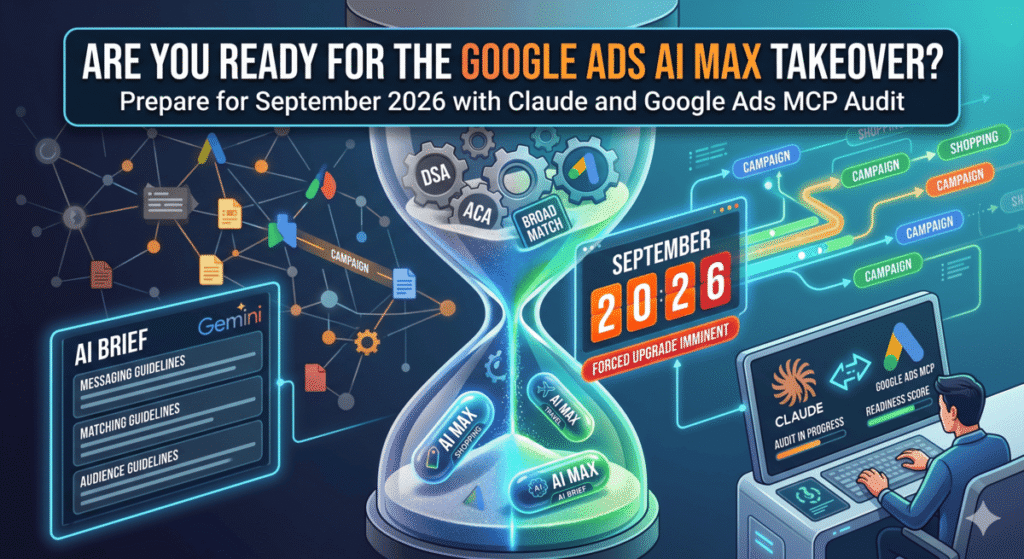
Google made three significant changes to AI Max on April 30, 2026: the feature is now out of beta, it expanded into Shopping and travel campaigns, and a new natural language control called AI Brief gives advertisers a way to guide the AI using plain language instead of keyword lists. Separately, Google confirmed that Dynamic Search Ads, automatically created assets, and campaign-level broad match will all be force-upgraded to AI Max in September 2026. If any of those settings exist in your accounts right now, the clock is running. This post covers exactly what changed, what the forced upgrade does to each legacy setting, and how to use Claude and the Google Ads MCP to identify and prepare every affected campaign before Google does it for you.
What Did Google Actually Announce on April 30?
Three things shipped on April 30. They are worth separating because they affect different campaign types and different advertiser decisions.
- AI Max for Shopping campaigns. Standard Shopping campaigns now have access to three AI Max features. Text customization generates headlines and descriptions from Merchant Center feed attributes rather than restating product titles. Final URL Expansion routes shoppers to the most relevant product page based on query intent, the same feature that has existed in Performance Max. Optimal Format Selection automatically chooses between a text ad and a Shopping ad depending on what fits the query best. All three can be toggled off individually if you want to preserve standard Shopping behavior.
- AI Max for travel formats. Travel advertisers get AI Max across hotel, flight, and vacation rental formats with unified feed management in one interface. The pitch here is that travel queries are increasingly conversational (“hotels near the Louvre with a pool under $200”), and static keyword lists struggle to match that kind of intent precisely.
- AI Brief. This is the most strategically interesting addition. AI Brief is a Gemini-powered natural language input layer inside AI Max for Search. Instead of configuring keywords, match types, and negative lists manually, you write a short brief in plain language that tells the AI what your ads should and should not do. There are three input categories: Messaging Guidelines (what the ad copy should say and avoid), Matching Guidelines (which searches to target or stay out of), and Audience Guidelines (who you are trying to reach and what matters to them). Before any campaign goes live, AI Brief shows a preview of sample assets and the types of searches it plans to target. You adjust the brief, run the preview again, and activate when it looks right. AI Brief is rolling out in English for Search campaigns first, with expansion to Performance Max and Shopping planned after.
- What Gets Force-Upgraded in September 2026?
Google announced the DSA sunset on April 15, two weeks before the April 30 product update. The automatic upgrade covers three legacy configurations, and what gets enabled after each upgrade is different:
- Dynamic Search Ads: All three AI Max features turn on by default. Search term matching, text customization, and Final URL Expansion are all enabled. Your legacy URL controls carry over. You will not be able to create new DSA campaigns after September through the Google Ads UI, Editor, or API.
- Automatically Created Assets (ACA): Campaigns with ACA enabled upgrade with search term matching and text customization on. Final URL Expansion is not enabled by default in this path.
- Campaign-level broad match: Campaigns with a broad match setting at the campaign level also upgrade to AI Max. Google has not published a complete breakdown of which features activate in this scenario.
The voluntary upgrade tools are already live, including in-UI banners, one-click A/B experiment flows, and a DSA-specific upgrade path. Google’s stated goal is to complete all automatic upgrades by the end of September.
Why the Performance Numbers Need Context
Google’s headline figure is a 7% lift in conversions when using the full AI Max feature suite compared to legacy search-term matching. That number is worth a closer look.
When AI Max launched in May 2025, the initial performance claim was a 14% lift. The current figure is 7%. That revision matters because it reflects actual rollout data rather than early controlled tests.
Independent research paints a more complicated picture. An August 2025 analysis found that 99% of impressions across approximately 30,000 search terms activated by AI Max produced zero conversions. A November 2025 study across 250-plus retail campaigns found AI Max delivering conversions at roughly 35% lower ROAS compared to traditional match types. Neither of those findings means AI Max cannot perform. They suggest that the quality of your feed data and landing pages has an outsized influence on results. Google’s own documentation points to feed quality as a critical variable. A separate January 2026 analysis found a nine-day gap between Google’s stated 24-hour automatic Merchant Center feed refresh cycle and actual update behavior, which means the AI may be generating copy from stale product attributes.
The practical implication: AI Max works better when your feed is accurate, your landing pages have clear signals about what you sell, and your exclusion lists are tight. Going into the September upgrade without auditing those three things is how you end up with search term reports full of irrelevant queries and a ROAS number that confuses your client.
How to Audit Your AI Max Exposure with Claude and the Google Ads MCP
The Google Ads MCP lets Claude pull live campaign data from your accounts without any CSV exports or manual reporting. Here is the audit workflow I have been running for client accounts.
Step 1: Identify all campaigns that will be force-upgraded.
Start a session in the account directory and ask Claude to use the Google Ads MCP to pull a full campaign list with campaign type, targeting settings, and whether DSA or ACA are enabled. The specific instruction:
Use the Google Ads MCP to pull all active campaigns in account [CUSTOMER_ID].
For each campaign, flag:
- Campaign type (Search, Shopping, PMax)
- Whether Dynamic Search Ads targeting is enabled
- Whether automatically created assets (ACA) are on
- Whether broad match is set at the campaign level
- Current monthly spend

Return a table sorted by spend descending.
Claude calls google-ads-download-report against your account, returns the structured data, and you immediately know which campaigns are in the September upgrade path and how much budget is attached to each. This is the step that consistently surprises agency teams who assumed they had no DSA exposure.
Step 2: Score each flagged campaign for AI Max readiness.
For each campaign on the upgrade list, ask Claude to fetch the primary landing page and evaluate it against three criteria: does the page clearly describe what the product or service does, does it contain enough attribute-level detail to support AI-generated copy variations, and are there any compliance or legal terms that would need to appear in every ad.
For each campaign flagged in the previous step, fetch the primary landing page
and evaluate:
1. Content depth: enough for AI Max to generate 3+ distinct ad variations?
2. Attribute coverage: materials, features, pricing, location signals present?
3. Compliance flags: any terms that must appear or must never appear in ads?

Return a readiness score (High / Medium / Low) with one-line reasoning per campaign.
Campaigns that score Low are the ones where you want to either improve the landing page before September or manually configure tight text guidelines before the upgrade runs.
Step 3: Write your CLAUDE.md before starting AI Brief drafts.
Before drafting AI Briefs, store your client or account context in a CLAUDE.md at the root of your working directory. Include brand voice guidelines, product or service categories, geographic restrictions, audience segments, excluded terms, and conversion goals. Claude reads this file at the start of each session, which means every AI Brief you draft in that session is informed by the same business context without you re-explaining it each time.
This is the part that goes beyond what you can do in a standard ChatGPT session. CLAUDE.md persists across conversations. The account context you write once is available for every future audit, brief draft, or performance review in that project folder. See my post on using CLAUDE.md for marketing agency workflows for the file structure I use.
Step 4: Draft AI Briefs for each campaign.
With the CLAUDE.md context loaded and the readiness scores from Step 2, ask Claude to draft an AI Brief for each campaign that will be upgraded:
Using the client context in CLAUDE.md, draft an AI Brief for [CAMPAIGN NAME].

Include:
- Messaging Guidelines: what the ads should always say, what they should never say
- Matching Guidelines: query categories to target, query categories to exclude
- Audience Guidelines: who this campaign reaches and what angle resonates with them

Format for direct paste into the AI Brief interface. Be specific and direct.
Use "always" and "never" language in the messaging section.
The resulting brief is ready to paste into the AI Max interface. The preview step in AI Brief will show you the sample searches and assets before anything goes live, so you can refine the brief before committing. Running this across a full account takes maybe an hour, compared to a full day of manual keyword auditing.
Step 5: Set up a /loop monitor for post-upgrade performance.
Once campaigns are upgraded, use the /loop command to run a weekly search term review via the Ads MCP. Ask Claude to flag any search terms with more than 10 impressions and zero conversions, group them by query theme, and suggest negative keyword additions. Automating this step is the difference between catching AI Max drift early and discovering it on a monthly reporting call.
Should You Upgrade Voluntarily Now or Wait Until September?
The case for upgrading now: you control the default settings, you can run the A/B experiment tools Google has made available, and you learn how AI Max performs in your specific account before the deadline pressure forces the issue. If your landing pages and feeds are in good shape, the sooner you upgrade the more data you accumulate.
The case for waiting: if your feed has accuracy issues or your landing pages are thin, upgrading now just means running bad AI Max campaigns for longer. Fix the inputs first. For Shopping campaigns specifically, address any Merchant Center feed refresh lag before enabling AI Max text customization, because copy drawn from stale feed attributes will not match current inventory.
The one situation where waiting is not a good option: if you are running DSA campaigns that cover your full site with broad URL targets and no exclusion lists. Those campaigns will upgrade in September with all three AI Max features on by default, including Final URL Expansion. If your site has pages you do not want ads sending traffic to, the time to build those exclusion lists is now, not when the upgrade email arrives.
Frequently Asked Questions
What is Google Ads AI Max?
AI Max is Google’s AI-powered feature set for Search campaigns that combines search term matching beyond keywords, AI-generated ad copy (text customization), and automatic landing page selection (Final URL Expansion). It launched in May 2025 and reached general availability in April 2026.
Which legacy settings get automatically upgraded to AI Max in September 2026?
Three configurations will be automatically upgraded: Dynamic Search Ads targeting, automatically created assets at the campaign level, and campaign-level broad match settings. Google has confirmed the upgrade will complete by end of September 2026.
What is AI Brief in Google Ads?
AI Brief is a natural language input layer inside AI Max for Search. Advertisers write a short brief using plain language to set messaging guidelines (what ads should and should not say), matching guidelines (which queries to target or avoid), and audience guidelines (who the campaign reaches). AI Brief is powered by Gemini and rolling out in English for Search campaigns first.
Does AI Max for Shopping replace Performance Max?
No. AI Max for Shopping is an optional feature set added to standard Shopping campaigns. Performance Max remains a separate fully automated campaign type. AI Max for Shopping adds three specific features: text customization, Final URL Expansion, and optimal format selection. Each can be toggled independently.
How do I use the Google Ads MCP with Claude to audit AI Max exposure?
With the Google Ads MCP connected in your Claude Code session, you can ask Claude to pull campaign data using the google-ads-download-report tool to identify all campaigns with DSA targeting, ACA, or campaign-level broad match enabled. Claude returns the data in a structured format you can immediately use to prioritize which campaigns need attention before the September deadline.
Is AI Max performing better than standard keyword targeting?
Google reports a 7% conversion lift using the full AI Max feature suite compared to legacy search-term matching. Independent testing has produced more mixed results, including a 2025 study finding 35% lower ROAS versus traditional match types across 250-plus retail campaigns. Results appear to correlate strongly with feed quality and landing page depth. Accounts with clean, detailed product feeds and strong landing pages see better results than accounts where those inputs are thin or stale.