Somewhere in the last 18 months, the SEO industry discovered a new hobby: inventing acronyms.
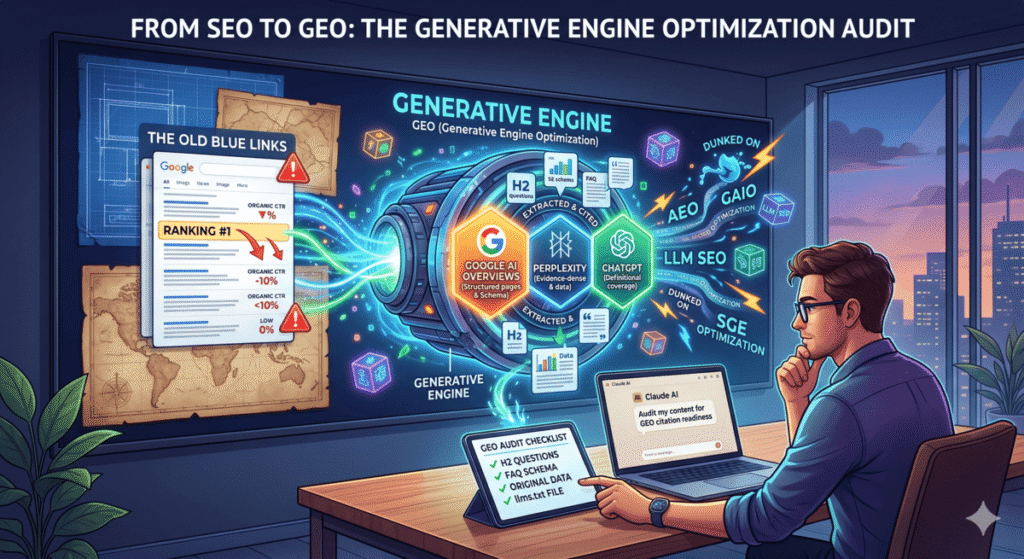
We got GEO (Generative Engine Optimization). Then AEO (Answer Engine Optimization). Then LLM SEO, AI Search Optimization, SGE optimization, and my personal favorite — someone on LinkedIn last month called it GAIO. Generative AI Optimization. There’s an entire corner of SEO Twitter that exists solely to dunk on whoever coined the newest one, and honestly, they’re right to.
The rebrandings are annoying. But underneath the alphabet soup is a real and concrete shift:
Ranking #1 no longer means you get seen.
Google AI Overviews now appear in 25–48% of all queries. When they do, organic CTR on that result drops by an average of 61%. Perplexity and ChatGPT are synthesizing answers from a handful of sources and surfacing them before anyone sees your blue link. If your content isn’t structured to be extracted and quoted, it gets skipped — even if you’re technically outranking everyone.
Call it GEO, call it AEO, call it whatever helps you sleep. The only question that matters is: when someone asks a question in your space, does your content get cited?
This post is a step-by-step audit workflow using Claude to answer that question — and a clear map for what to fix when the answer is no.
Why Different Platforms Cite Different Content
Most GEO guides treat “AI search” as one monolithic thing. It isn’t. The three platforms that drive meaningful traffic have meaningfully different citation behaviors. Optimizing for one doesn’t cover the others.
| Platform | What It Favors | Recency Weight | Schema Impact | Biggest Gap on Most Pages |
|---|---|---|---|---|
| Google AI Overviews | Structured pages with existing organic authority. H2 hierarchy, schema markup, multi-modal content (video helps). | Medium | High — FAQ + Article schema directly influences extraction | No FAQ schema. Definitions buried mid-page instead of up front. |
| Perplexity | Evidence-dense, recently updated content that cites other sources. Stats, numbered lists, original data. | High — prefers content updated in last 6–18 months | Medium | Zero original data. No outbound citations. Page hasn’t been touched in 2+ years. |
| ChatGPT | Encyclopedic, definitional coverage of a topic. “What is X / how does X work” structure. Wikipedia-style completeness. | Low | Low | Core term not defined in the opening paragraph. Tactical instead of foundational. |
Only 11% of domains get cited by both ChatGPT and Perplexity. Most content is optimized for zero of these patterns. That gap is where this audit lives.
The Concept Most GEO Guides Skip: Passage-Level Extraction
Before running the audit, understand how these platforms actually pull content. They don’t index your page — they extract passages from it.
A passage is a self-contained chunk of text, usually 2–5 sentences, that fully answers one specific question. Google’s Passage Indexing (now baked into core ranking) treats each chunk of your page as independently rankable. AI Overviews, Perplexity, and ChatGPT work the same way — they’re scanning for passages they can lift and quote directly.
This means long paragraphs that bury the answer, definitions that appear in sentence four, and H2s that are descriptive instead of question-formatted all kill your citation probability — regardless of your overall page quality.
The fix: every major section of your page should open with a sentence that directly answers the question the section is about. Don’t build to the answer. Lead with it.
The Claude GEO Audit: Five Steps
Run this on any existing page that targets a question-based keyword. Before you start, verify that AI Overviews are actually appearing for your keyword — Google the term and look for the generated box above organic results. If it’s not there, this audit is still useful for Perplexity and ChatGPT, but the urgency is lower.
Step 1: Citation Readiness Score
Open Claude. Paste the full text of your content. Use this prompt exactly:
“You’re auditing content for AI citation readiness. Analyze what I’ve pasted for its likelihood of being cited by Google AI Overviews, Perplexity, and ChatGPT. Score each platform 1–10. For each score, list the specific structural, factual, or formatting issues preventing a higher number. Don’t explain what GEO is — I know. Just diagnose the page. Content: [paste content]”
Here’s what Claude returned when I ran this on my own Claude AI for SEO guide:
Google AI Overviews: 5/10
Three issues. First, you define “Claude for SEO” in paragraph four — AI engines extract from the first 150 words or skip extraction entirely. Move a clean one-sentence definition to the opening paragraph. Second, you have a FAQ section but it’s not wrapped in JSON-LD schema markup, which is the primary signal Google uses to pull Q&A content into AI Overviews. Third, your H2s are descriptive but not question-formatted — “Using Claude for Keyword Research” should be “How Do You Use Claude for Keyword Research?” to match extraction patterns.Perplexity: 4/10
This page has no original data. Perplexity heavily rewards pages that contain statistics, survey results, or proprietary metrics. Right now the claims are unsupported. There are also zero outbound citations to authoritative sources — Perplexity rewards being part of a citation web. Add 2–3 stats with source links and cite at least one published study.ChatGPT: 7/10
Best of the three. The page is comprehensive and covers the topic well. Main gap: the core term isn’t defined encyclopedically in the intro — ChatGPT in browsing mode looks for an “X is [definition]” sentence structure near the top of the page. Add that and this score hits a 9.
Scores below 7 are your actionable gaps. Work from the lowest score up.
Step 2: Platform-Specific Fix List
Once you have the scores, go deep on whichever platform matters most. For most SEOs, that’s Google AI Overviews. Use this follow-up:
“Based on the content above, give me the five highest-impact changes I can make to increase Google AI Overviews citation probability. Include the actual rewritten copy or markup where relevant. Skip the theory — just give me the fixes.”
Run it again with “Perplexity” or “ChatGPT” substituted in if those platforms are priorities. The recommendations will be different enough to matter.
Step 3: Build the FAQ Block
FAQ sections are the single highest-ROI addition for citation readiness. Every platform extracts Q&A patterns. Without one, you’re leaving citations across all three platforms on the table.
“Generate 8 People Also Ask-style questions this content should answer to improve AI citation probability. For each question, write a 2–3 sentence answer that: leads with the direct answer in the first sentence, includes at least one specific data point or example, and is written as a standalone passage that makes sense without reading the rest of the page. Numbered list.”
Select the best five or six. Add them as an FAQ section at the bottom of the page. Then immediately move to Step 4.
Step 4: Generate FAQ Schema
A FAQ section without schema is a missed opportunity. Paste the Q&As back to Claude:
“Generate FAQ schema markup in JSON-LD format for these questions and answers. Output only the code block, ready to paste into a WordPress custom HTML block: [paste Q&As]”
Drop the output into a custom HTML block at the bottom of your WordPress post. This is the specific markup Google uses to pull FAQ content into AI Overviews — skipping it is why most pages score low on the citation readiness audit even when they have solid content.
Step 5: Competitive Citation Check
The last step is figuring out who is getting cited for your keyword right now and why. Go to Perplexity, search your target keyword, and note the three URLs in the citation panel on the right. Then:
“I want to understand why these pages get cited for [keyword] in AI search results. Here are three URLs that are currently being cited: [URLs]. Compare their structure — content format, data usage, FAQ presence, citation links, passage clarity — and tell me specifically what my content is missing relative to theirs. Don’t summarize what they have. Tell me the gap.”
This is the prompt that generates the most useful output. It stops being theoretical and starts being a direct comparison between your page and the pages winning citations in your space right now.
Add an llms.txt File (Takes Five Minutes)
llms.txt is a plain-text file you place at the root of your domain — like robots.txt, but for large language models. It tells AI crawlers what your site covers, which pages are authoritative, and how your content should be understood. It won’t move your citation numbers overnight, but it costs almost nothing to set up and it’s becoming a baseline expectation for AI-optimized sites.
Use this Claude prompt to generate one:
“Generate an llms.txt file for my website. Here’s what the site covers: [brief description]. Here are my most important pages and what each one is about: [list URLs and topics]. Format it as a clean plain-text file following the llms.txt spec — site description, key pages, content focus, and any guidance for how AI tools should use this content.”
Upload the output to your domain root as /llms.txt. If you’re on WordPress with Hostinger or most managed hosts, you can drop it directly into the public_html folder via File Manager.
How to Track Whether Any of This Is Working
Most GEO guides end at the optimization steps and say nothing about measurement. Here’s how to actually track citation performance without paying for an enterprise tool:
Manual method (free, takes 10 minutes monthly): Search your five most important target keywords in both Perplexity and Google, check whether your domain appears in the cited sources, and log it in a spreadsheet. Not sophisticated, but it tells you if you’re in or out.
GSC as a proxy signal: A sudden CTR drop on a keyword where impressions stayed flat is usually a sign that an AI Overview appeared for that query and absorbed the clicks. Filter your Search Console data for queries with flat impressions + falling CTR to identify which pages were just affected.
Paid tools if you’re doing this at scale: Profound and Otterly.ai both track AI citations across platforms. Semrush added an AI Overviews filter to its position tracking. If you’re managing multiple clients, one of these is worth the cost — manual tracking across a full portfolio doesn’t scale.
One realistic expectation: GEO changes take 3–6 months to show up in AI model responses. Models aren’t continuously crawling — they update periodically. Make the changes, verify the schema is rendering correctly, and give it time.
GEO Audit Checklist
Save this for every content refresh. These are the checks that move citation scores from mediocre to competitive:
- ☐ Core term defined in a clean “X is [definition]” sentence within the first 150 words
- ☐ H2s are question-formatted, not just descriptive (“How Do You X” vs. “Using X”)
- ☐ Each major section opens with a direct answer (passage-first structure)
- ☐ FAQ section with 5+ questions covering PAA and related queries
- ☐ FAQ schema in JSON-LD format embedded on the page
- ☐ At least 3 statistics with linked source citations
- ☐ At least 1 outbound link to an authoritative external source per major section
- ☐
dateModifiedin page schema reflects a recent update (within 12 months) - ☐ Article schema or HowTo schema applied where relevant
- ☐ llms.txt file live at domain root
- ☐ Page has been verified in Perplexity search to confirm it’s crawlable
Eleven checks. Most well-ranked pages fail five or six of them.
The High-Leverage Move Most People Skip
Almost everything written about GEO focuses on building new content optimized for citation from the start. That’s fine if you’re starting a new site.
If you have existing content that’s already ranking, retrofitting it is faster and higher leverage. You’ve done the hard work — indexed, earning authority, probably pulling consistent organic traffic. You just need to restructure what’s already there so AI engines can extract from it.
A page sitting at position 3 with solid backlinks but no FAQ schema and buried definitions is one 30-minute Claude session away from being citation-ready. A brand new page optimized from scratch takes months to build the authority to even be considered.
Start with your top 10 pages by organic traffic. Run the five-step audit on each one. Fix the checklist gaps. That’s the highest-ROI version of this work — and the Claude skills workflow covered earlier in this series lets you turn this into a reusable automated process that runs on any URL you feed it.
Frequently Asked Questions
What’s the actual difference between GEO, AEO, and SEO?
Traditional SEO is about ranking in a list of blue links. AEO targets direct answer boxes and featured snippets — structured answers Google pulls from a single page. GEO targets citations inside AI-synthesized responses where the answer is generated from multiple sources and yours needs to be one of them. In practice the three overlap heavily — the structural improvements that help GEO (clear definitions, FAQ schema, original data) also help traditional SEO. The distinction matters mostly for prioritization: if AI Overviews are appearing for your core keywords, GEO is the immediate priority.
Does this work for small sites without strong domain authority?
For Google AI Overviews, existing organic authority matters — pages that aren’t ranking on page one rarely get cited regardless of structure. But Perplexity and ChatGPT are more egalitarian. Perplexity regularly cites niche, lower-authority pages that have strong evidence density and original data. If your domain authority is under 30, focus GEO efforts on Perplexity first — it’s a more achievable citation target and still drives meaningful traffic in research-oriented queries.
How do I find which keywords have AI Overviews active?
Search your target keywords in Google while signed out of your account. If an AI-generated summary appears above the organic results, AI Overviews is active for that query. Ahrefs and Semrush both have filters to identify which tracked keywords trigger AI Overviews — useful if you’re auditing a large keyword portfolio instead of checking manually.
What kind of content gets cited by Perplexity vs. ChatGPT?
Perplexity rewards evidence: stats, original data, recent publication dates, and pages that cite other sources. It treats citation density as a quality signal — pages that cite authoritative external sources are seen as more reliable. ChatGPT in browsing mode rewards completeness: encyclopedic coverage, clear definitions, and content structured around “what is X / how does X work.” Only 11% of domains get cited by both, which means the optimization paths diverge and a page built for one may underperform on the other.
How long before GEO changes show results?
Expect 3–6 months for AI model responses to reflect content changes. Unlike Google’s crawler which operates continuously, AI models update their training and retrieval layers periodically. Schema changes and structural improvements can show up faster in Google AI Overviews (weeks, not months) because those pull from live index data. Perplexity and ChatGPT changes take longer to materialize. Make the fixes, verify the schema is rendering correctly in testing tools, and track monthly.
Do I need to create an llms.txt file for every domain I manage?
Yes, if you’re serious about AI search visibility. It takes five minutes per domain with Claude and it’s one of the few GEO optimizations that has no downside and near-zero cost. Think of it as the robots.txt equivalent for the AI crawl era — not having one isn’t catastrophic, but having one is a basic signal that your site is maintained and AI-crawler aware. Start with your highest-traffic domains first and work down the list.
What’s Next
Whether you call it GEO, AEO, or “making your content survive the AI layer eating your clicks” — the audit is the same five steps. Score it, fix the gaps, add the schema, check who’s winning citations in your space, and set up a way to track it monthly.
If you want a pre-built Claude skill that runs this entire workflow automatically on any URL — pulling the content, running the audit prompts, and outputting a prioritized fix list — that’s inside The AI Marketing Stack, along with the rest of the Claude Code setup I use for client work.