

What is the Screaming Frog MCP? The Screaming Frog MCP server (released in SEO Spider v24) lets Claude run crawls, generate reports, execute custom Node.js scripts against crawl data, and write findings to your project files, all without leaving a Claude Code session. You give Claude a domain and an audit brief. It crawls, reports, and documents the findings. No CSV export, no spreadsheet, no manual handoff between tools.
Screaming Frog version 24 ships a native MCP server. That means Claude can now run crawls, query the results, filter by issue type, and write findings directly to your project files. No CSV to touch, no copy-pasting a single row of data. The crawl is the tool call. The analysis runs immediately after. Everything lands where it belongs.
That is what the Screaming Frog MCP actually does: it removes the handoff between crawling and thinking. The workflow that used to require you to crawl, export, open a spreadsheet, filter, interpret, and write up findings can now run as a single Claude Code session. I have been running this in production on client sites and the difference in time-per-audit is significant.
This post is not a setup walkthrough. Chris Long covered the basics of STDIO setup clearly. What I want to show you is what to actually build with it once it is connected: five specific Claude Code workflows that no other post has covered. Each one is built on the eight MCP tools the integration exposes.
What Is the Screaming Frog MCP and Why Does It Matter for Claude Code Users?
MCP (Model Context Protocol) is the open standard that allows Claude to call external tools as part of a conversation. When Screaming Frog ships an MCP server, it means Claude can treat crawl operations as native tool calls rather than waiting for you to export data and paste it in.
Screaming Frog v24 is the first desktop crawler to ship a bundled local MCP. Sistrix released a cloud-based MCP in August 2025, but that is a fundamentally different architecture, querying server-side aggregated data. Screaming Frog’s MCP runs on your machine, against your crawl configurations, on raw export data. The distinction matters for Claude Code practitioners because local execution means you can pair it with CLAUDE.md reads and writes, parallel subagents, and /loop scheduling in ways a remote API endpoint does not support.
As Polina Kalashnikova observed in the discussion around this release: “SEO tooling is quietly evolving into AI-native infrastructure.” This release is a concrete example of what that looks like in practice. Not a chatbot that answers questions about SEO, but a toolchain Claude can operate directly.
If you are newer to MCP in general, I covered the fundamentals in Setting Up MCP for Marketers. The Screaming Frog integration follows the same pattern: register the server, verify the connection, and Claude can call it like any other tool.
How Do You Set Up the Screaming Frog MCP with Claude Code?
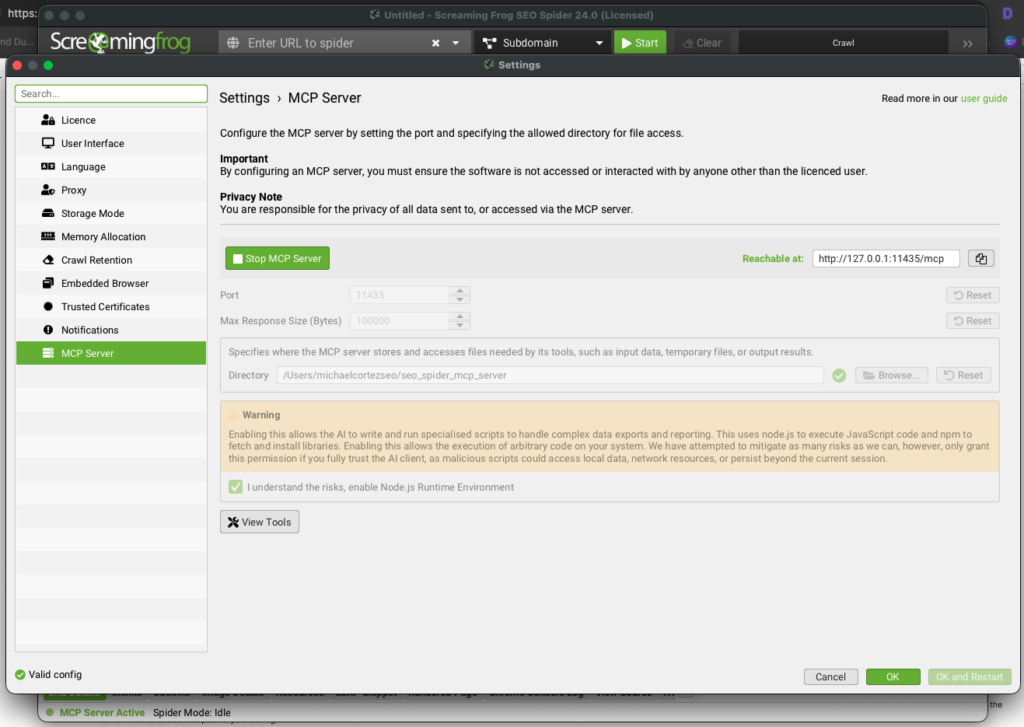
There are two paths: the official SF v24 MCP (Node.js, bundled) and the community Python implementation. Both work. Here is how to get either running.
Official Screaming Frog v24 MCP (Recommended for most users)
Update Screaming Frog to version 24 via Help > Check for Updates. Then open the SEO Spider and navigate to Configuration > MCP Server to enable it. You will set a scoped base directory (for example, /Users/yourname/seo_spider_mcp_server) that restricts which crawl files Claude can access.
To register it with Claude Code, add the following to your claude_desktop_config.json:
{
  "mcpServers": {
    "screaming-frog": {
      "command": "node",
      "args": ["/path/to/sf-mcp-server/index.js"]
    }
  }
}
The exact path to index.js depends on where Screaming Frog installs the MCP server files on your system. Check Configuration > MCP Server in the SEO Spider GUI after enabling it. The dialog shows the base directory where the server files land. Use that path in your config.
Alternatively, in Claude Desktop go to Settings > Extensions > Advanced Settings > Install Extension and point it to the downloaded MCP file.
Smoke test by asking Claude to call sf_list_crawls. If it returns a list of recent crawls, you are connected.
Community Python MCP (More filtering control)
The community implementation at bzsasson/screaming-frog-mcp exposes the same core tools via Python. Install via:
pip install screaming-frog-mcpThen register in claude_desktop_config.json:
{
  "mcpServers": {
    "screaming-frog": {
      "command": "uvx",
      "args": ["screaming-frog-mcp"],
      "env": {
        "SF_CLI_PATH": "/Applications/Screaming Frog SEO Spider.app/Contents/MacOS/ScreamingFrogSEOSpiderLauncher"
      }
    }
  }
}
On Windows, replace the path with: C:\Program Files (x86)\Screaming Frog SEO Spider\ScreamingFrogSEOSpiderCli.exe
Important for the community MCP: Close the Screaming Frog GUI before running any MCP tool calls. The application uses an internal database that only one process can access at a time. The typical sequence is: run the crawl in the GUI with your preferred configuration, close the GUI, then use Claude Code to analyze the results.
The official SF MCP tool set
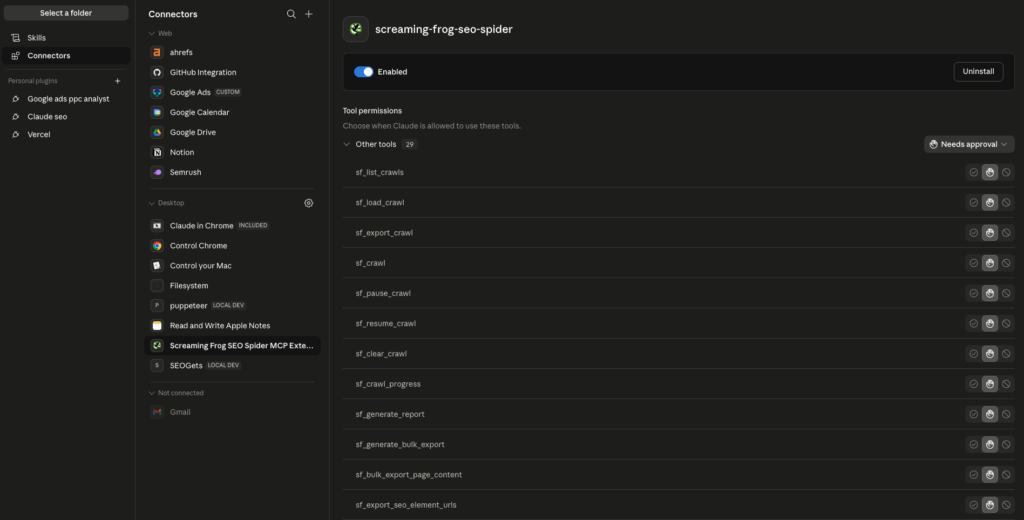
The official v24 MCP exposes a much richer set of tools than early community implementations. Here are the ones that matter most for Claude Code workflows:
Crawl control:
- sf_crawl: start a crawl. Takes a
crawl_urland optionalconfig_path,crawl_name,project_name - sf_crawl_progress: check progress on a running crawl
- sf_list_crawls: list recent crawls with metadata
- sf_load_crawl: load a previously saved crawl for analysis
- sf_pause_crawl / sf_resume_crawl: pause and resume mid-crawl
Data export:
- sf_generate_report: generate a report by category, e.g.,
"Response Codes:All","Page Titles:Missing","H1:Duplicate". Exports as CSV or NDJSON to a file path or directly into Claude’s context - sf_list_available_reports: discover all available report categories before generating
- sf_generate_bulk_export: run a full bulk export by type
- sf_export_crawl: export the full current crawl to a file
- sf_export_seo_element_urls: export URLs filtered by SEO element and condition
- sf_export_embeddings: export content embeddings generated by the Spider’s AI integrations
Per-URL analysis:
- sf_url_info: get all crawl data for a specific URL
- sf_url_links: get all inlinks and outlinks for a URL
- sf_url_content: get the page content for a URL
- sf_get_url_screenshot: capture a screenshot of a URL as crawled
Scripting and file operations:
- sf_run_node_js_script: run a custom Node.js script against your crawl data. This is the highest-ceiling tool in the set
- sf_write_text_file / sf_read_text_file: write and read files within the base directory
- sf_npm_install: install Node.js packages for use in scripts
The sf_generate_report tool does the filtering work you would previously do in a spreadsheet. Ask for "Response Codes:4xx" and you get only 4xx pages. Ask for "Page Titles:Missing" and you get only pages with no title tag. The sf_run_node_js_script capability goes further. Claude can write a Node.js script, save it to the base directory, and execute it against the crawl. Complex cross-tab analysis that used to require Python or Excel macros runs directly inside the session.
The community Python MCP at bzsasson/screaming-frog-mcp exposes a smaller set of tools (crawl_site, crawl_status, read_crawl_data with regex filtering, and a few others) and requires Python 3.10+. It is a solid option if you need the regex read_crawl_data filtering pattern, but the official MCP is the right starting point for most users.
Workflow 1: Full Technical Audit in One Session With No CSV Export
The most immediate use of the SF MCP in Claude Code is collapsing the audit pipeline. Here is the agent-native version of a technical SEO audit that previously required 45-90 minutes of manual data handling.
Start a Claude Code session and ask it to read your CLAUDE.md for the client context: their domain, primary service pages, and any known issues from prior audits. Claude reads that context before calling a single tool.
Then give it a single instruction: “Run a full technical audit of [domain.com] and write the findings to CLAUDE.md under a new ## Technical Audit section with today’s date.”
Claude Code runs the sequence:
- Calls
sf_list_crawlsto confirm the crawl environment is connected and ready - Calls
sf_crawlwith the target domain ascrawl_urlto start the crawl - Polls
sf_crawl_progressuntil the crawl completes - Calls
sf_list_available_reportsto confirm available report categories, then runssf_generate_reportfor each:"Response Codes:4xx","Page Titles:Missing","Meta Description:Missing","H1:Missing","Page Titles:Duplicate" - For any issue category needing deeper analysis, writes and runs a custom Node.js script via
sf_run_node_js_scriptto cross-reference data across report tabs - Writes a structured findings report directly to
CLAUDE.md
The key difference from what you could do in Claude Desktop: the CLAUDE.md write at the end. The findings are not in the chat. They are in the project file. The next session picks them up automatically. This is what “persistent audit memory” looks like in practice, and it is something you cannot replicate by pasting into a chatbot.
For agencies running this across multiple clients, store each client’s findings in their project CLAUDE.md at ~/clients/[client-name]/CLAUDE.md. Every session for that client opens with the crawl history already loaded.
Workflow 2: The SF Plus Ahrefs MCP Link Equity Audit
Screaming Frog’s own release blog mentions internal link equity flow diagrams as a flagship example, combining crawl data with Ahrefs data. This is the workflow they are describing, built out explicitly for Claude Code.
The goal: understand which pages are receiving the most internal link equity, whether that equity is aligned with your target keywords, and which high-value pages are orphaned or under-linked.
In Claude Code, run both MCP tools in the same session:
- SF side: Call
sf_generate_bulk_exportto export all inlinks and outlinks. This gives you the complete internal link graph. Then callsf_export_crawlto write the full crawl to a file in your base directory. - Ahrefs side: Call
mcp__claude_ai_ahrefs__site-explorer-pages-by-trafficto pull organic traffic by page, andmcp__claude_ai_ahrefs__site-explorer-organic-keywordsto get primary keyword per page - Analysis: Write a Node.js script via
sf_write_text_file, then run it withsf_run_node_js_scriptto cross-reference the two datasets: find pages with high organic potential that receive fewer than 3 internal links, and find pages with no keyword rankings receiving significant internal link equity
The output is an internal link equity gap report: a prioritized list of where to add internal links, where to remove them, and what anchor text to use based on the target keyword per destination page.
This is the kind of analysis that used to take an hour with two open browser tabs, two exports, and a VLOOKUP. In Claude Code it runs as a single session where both MCPs contribute data to one analysis.
For more on the internal linking layer specifically, I covered the full approach in AI Internal Linking: How to Audit, Optimize, and Automate Your Entire Link Structure with Claude Code. The SF MCP makes that workflow significantly faster to execute.
Workflow 3: Scheduled Crawl Monitoring With /loop
Screaming Frog v24 ships a native auto-compare crawls feature that diffs the current crawl against the previous one, surfacing new URLs, missing URLs, status code changes, and metadata modifications automatically. When you pair this with Claude Code’s /loop command, you get a standing regression monitor that catches issues before your client’s next report.
Save the following as a skill file at ~/.claude/skills/sf-crawl-monitor/SKILL.md:
# SF Crawl Monitor

Read CLAUDE.md for client domain and last crawl ID.
Call sf_crawl with the client domain as crawl_url.
Poll sf_crawl_progress until complete.
Call sf_generate_report for "Response Codes:4xx", "Response Codes:5xx", "Response Codes:3xx".
Call sf_generate_report for "Page Titles:Missing" and "H1:Missing".
Compare page titles and meta descriptions against the stored baseline in CLAUDE.md.
Write a ## Crawl Diff [DATE] section to CLAUDE.md listing:
- New issues since last crawl
- Resolved issues since last crawl
- Unchanged critical issues
If any new 5xx errors or pages with missing H1 are found, flag as URGENT.
Then in your terminal, start the monitoring loop:
/loop 7d /sf-crawl-monitorEvery seven days, Claude Code runs the crawl, diffs against the stored baseline in CLAUDE.md, and writes the delta report. You get a weekly regression check without scheduling a single calendar reminder or remembering to run a tool.
For clients on retainer, this is the difference between reactive and proactive SEO. When a developer pushes a template change that accidentally strips H1s from 200 blog posts, you know within a week rather than on the next quarterly audit.
The /loop command is covered in depth in The /loop Command: How to Run Continuous AI Monitoring on Your Marketing Campaigns. The SF MCP is one of the highest-value applications for it I have found.
Workflow 4: Parallel Subagents for Page-Type Analysis
Most technical SEO issues are not uniform across a site. The problems on blog posts are different from the problems on product pages, which are different from the problems on location pages. Running a single analysis across all page types produces a muddled report where “fix title tags” buries the fact that it only affects one page type.
Claude Code’s parallel subagent architecture solves this. Instead of one sequential analysis, you launch multiple agents simultaneously, each focused on one page type. Here is how that looks for a typical service business site:
After the crawl completes and sf_generate_report has run for each relevant category, give Claude Code this instruction:
“Launch three parallel subagents. Agent 1 analyzes all blog posts (URLs matching /blog/): check title lengths, meta descriptions, H1 presence, internal link count, and word count against our minimums. Agent 2 analyzes all service pages (URLs matching /services/): check for FAQ schema, LocalBusiness schema, NAP consistency, and canonical tags. Agent 3 analyzes all location pages (URLs matching /[city]/): check for LocalBusiness schema, hreflang if applicable, and whether the page title includes the location keyword. Each agent writes its findings to CLAUDE.md under a named section. Run all three simultaneously.”
Three subagents run in parallel against the same crawl data. What would take 15-20 minutes of sequential analysis often completes in under 5. Each agent’s findings land in a named section of CLAUDE.md, organized by page type and ready to turn into a client report.
The practical result: your audit output is already structured. You are not sorting a flat CSV by page type after the fact. The structure was built into the analysis from the start.
You can see this parallel subagent pattern applied to other SEO workflows in Custom Claude Skills: Build Once, Use Forever. The SF MCP adds a reliable crawl data source to every one of those patterns.
Workflow 5: Persistent Crawl Memory Across Every Client Session
The single biggest difference between using Claude Desktop and Claude Code for SEO work is persistence. Claude Desktop gives you a conversation. Claude Code gives you a project, one where context from every prior session is available the moment you open a new one.
Here is how to structure CLAUDE.md so that every SF crawl contributes to a growing knowledge base for each client:
## [Client Name]: Crawl History

### Crawl 2026-05-27
- Total URLs crawled: 847
- 4xx errors: 12 (listed below)
- Missing H1s: 3
- Redirect chains (3+ hops): 5
- Duplicate meta descriptions: 18
- Pages with title < 30 chars: 7
- Critical issues: [list]

### Crawl 2026-04-15 (resolved issues)
- 4xx errors: 19 → 12 (7 resolved)
- Redirect chains: 8 → 5 (3 resolved)
When you start a new session three months later, Claude reads this context before running anything. It knows the baseline. It knows what was fixed and what was not. It writes the new crawl as a diff against the most recent prior crawl automatically.
For a client on a six-month retainer, this means every audit is cumulative. You are not starting from scratch each time. You are extending a documented record of technical health over time. That is exactly what a retainer client is paying for.
The sf_list_crawls and sf_clear_crawl tools complete the workflow. At the start of each session, Claude lists stored crawls via sf_list_crawls, clears crawls older than 90 days via sf_clear_crawl, and keeps the working set clean without you managing it manually.
The full picture of using Claude Code as a persistent client intelligence layer is in Claude for SEO: The Complete Guide to AI-Powered Search Optimization. The SF MCP is now one of the core data inputs to that system.
What Does the Screaming Frog MCP Not Do?
This is the section most posts skip and this matters.
In the discussion around Chris Long’s video on the SF MCP launch, one commenter made a point that deserves more space than it got: crawl health and AI citation visibility are two different problems with almost no correlation. A site with a perfect crawl (no 4xx errors, clean canonicals, complete title tags, fast response times) can still have zero citations in ChatGPT, Perplexity, or Google AI Overviews. And a technically imperfect site can rank well in AI-generated answers if the content signals are strong.
The Screaming Frog MCP tells you what Google’s crawler can find and read. It does not tell you what AI systems choose to cite. Those are separate audit questions requiring separate tools.
For AI citation visibility specifically:
- Entity signals: whether your brand is disambiguated in Google’s Knowledge Graph. This requires Google NLP API analysis and Wikidata corroboration checks, not crawl data.
- Passage-level citability: whether your content contains self-contained answer blocks that AI systems can extract. This requires content analysis, not a technical crawl.
- Information gain signals: whether your content covers topics with greater depth than competing pages. This is a content evaluation, not a crawl result.
Technical SEO is necessary but not sufficient for AI search visibility. Use the SF MCP for what it does well: finding crawlability issues, broken links, metadata gaps, redirect chains, and structural problems. Use a separate workflow for AI citation readiness.
I covered the AI citation layer in depth in the GEO audit workflow at GEO Audit with Claude. The two workflows are complementary: run the SF technical audit first, run the GEO citation audit second.
Official SF v24 MCP vs. Community Python Implementation: Which Should You Use?
The short answer for most Claude Code practitioners: start with the official v24 MCP. It is maintained by Screaming Frog, aligns with the auto-compare crawls feature in v24, and has official documentation. The community Python implementation at bzsasson/screaming-frog-mcp offers more granular CSV filtering and explicit pagination control for large crawls, which matters if you are regularly crawling sites over 50,000 URLs and hitting context window limits.
One operational note worth knowing: the community MCP requires you to close the Screaming Frog GUI before querying via Claude Code. The application’s internal database only allows one process at a time. The workflow is: crawl in the GUI where you have full configuration control (JavaScript rendering, custom extraction, crawl scope), close the GUI, then switch to Claude Code for the analysis layer. This is not a significant friction point once you know it. But it will cause confusing errors if you do not.
Frequently Asked Questions
Does the Screaming Frog MCP work with Claude Code or only Claude Desktop?
It works with both. Claude Desktop supports the MCP via Extensions settings. Claude Code supports it via claude_desktop_config.json or the --mcp-config flag. The Claude Code integration is more capable because it supports CLAUDE.md reads and writes, persistent project context, parallel subagents, and /loop scheduling. None of those are available in Claude Desktop.
Do I need a paid Screaming Frog license to use the MCP?
The free version of Screaming Frog limits crawls to 500 URLs. For any real client site, you need the paid license, which costs £199 per year per single install as of May 2026. The MCP itself is included in the v24 update at no additional cost for licensed users.
Can Claude run a crawl completely headlessly without opening Screaming Frog?
Yes, through the crawl_site tool. Claude initiates the crawl in the background via the CLI and polls crawl_status until complete. For the community Python MCP, the GUI must be closed first. For advanced configuration (JavaScript rendering, custom extraction rules), run the crawl in the GUI with your settings applied, then use the MCP for the analysis layer.
How do I prevent large site crawls from overwhelming Claude’s context window?
Use sf_generate_report with a specific category rather than exporting the full crawl. Requesting "Response Codes:4xx" returns only 4xx pages, not the entire crawl. For complex cross-tab analysis on large sites, write a Node.js script via sf_write_text_file and execute it with sf_run_node_js_script. The script runs outside Claude’s context window, writes results to a file, and Claude reads just the summary output. This is the pattern the SF MCP server instructions explicitly recommend for large sites.
Can I use the SF MCP alongside other SEO tool MCPs in the same session?
Yes, and this is where Claude Code’s multi-MCP support becomes genuinely useful. Screaming Frog for crawl data, Ahrefs for organic keyword and backlink data, Google Search Console for impression and click data. All of them callable in the same session. Claude can cross-reference these datasets without you switching between tabs or exporting anything. The link equity audit workflow described above is one example of this in practice.
What happens to the CSV exports after Claude analyzes them?
Exported CSVs are stored in ~/.cache/sf-mcp/exports/ and automatically cleaned up after one hour by default. You can extend retention by setting SF_EXPORT_TTL_SECONDS in your environment config. For persistent storage of findings, write the structured results to CLAUDE.md rather than relying on the CSV cache.
Is the Screaming Frog MCP suitable for technical SEO beginners?
The MCP itself does not require SEO expertise to operate. Claude handles the tool calls. But interpreting the findings, prioritizing what to fix, and making implementation decisions still requires SEO judgment. Screaming Frog positioned the v24 MCP correctly: it is not a replacement for an experienced SEO professional. It removes the mechanical work so the experienced professional can focus on judgment.
What’s Next
The Screaming Frog MCP is available now in v24, the license covers it at no additional cost, and the setup takes under 15 minutes if you have used MCP tools before. The five workflows above range from the immediately practical (full audit in one session) to the infrastructure-level (persistent crawl memory, scheduled monitoring).
If you are building out your Claude Code SEO toolkit and want a structured starting point, I put together a guide to the full stack of tools worth connecting in Claude for SEO: The Complete Guide. The SF MCP is one of the highest-value additions to that stack right now.
If you want to see how these monitoring and audit workflows get built as permanent skill files (invoked with a single command rather than writing the instructions each time), that is covered in Custom Claude Skills: Build Once, Use Forever.
I share new Claude Code workflows for SEO and PPC every week. If you want them in your inbox, subscribe below.